Solve a loan payment
Compute the monthly payment on a loan with the time value of money solver in the Calculator: fill four fields, leave the fifth empty, and press Enter.
Goal
Compute the monthly payment on a 300,000 loan at 6% a year over 30 years, with the time value of money (TVM) solver in the Calculator.
Before you start
The TVM solver relates five values: the number of payments (n), the
interest rate (rate), the amount today (pv), the payment (pmt) and
the amount left at the end (fv). Fill any four and the solver computes
the fifth.
The sign shows the direction of the money. Money received is positive.
Money paid out is negative. A loan received is a positive pv, so its
payment is negative.
Steps
-
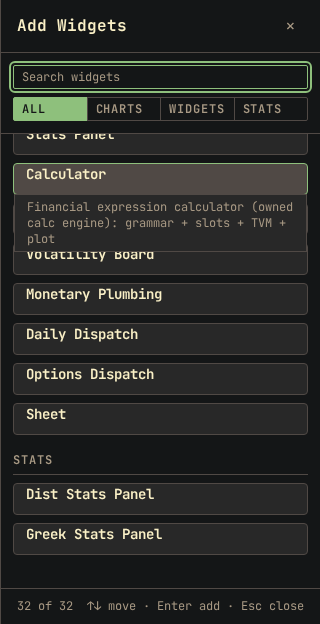
Click Add widget and select Calculator.
-
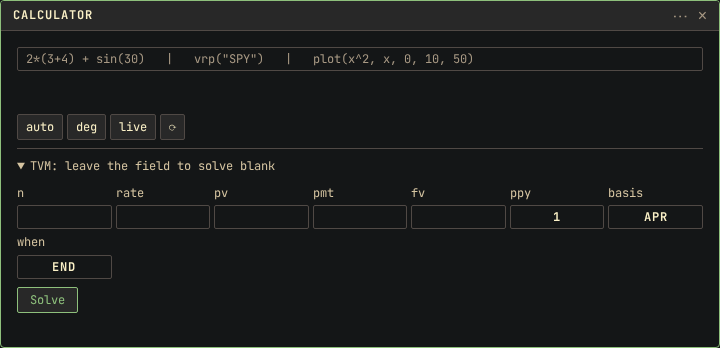
Click TVM: leave the field to solve blank at the bottom of the Calculator. Five fields and three selects open.
-
Set ppy to
12, for monthly payments. Leave basis atAPRand when atend. -
Click the n field and type
360, the number of monthly payments in 30 years. -
Press ArrowDown to move to rate and type
0.06, the yearly rate as a decimal. -
Press ArrowDown to move to pv and type
300000. -
Press ArrowDown to move to pmt and leave it empty. The solver computes this field.
-
Press ArrowDown to move to fv and type
0, for a loan paid off at the end.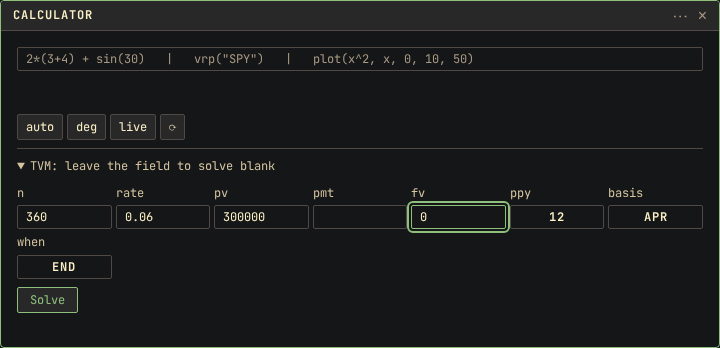
-
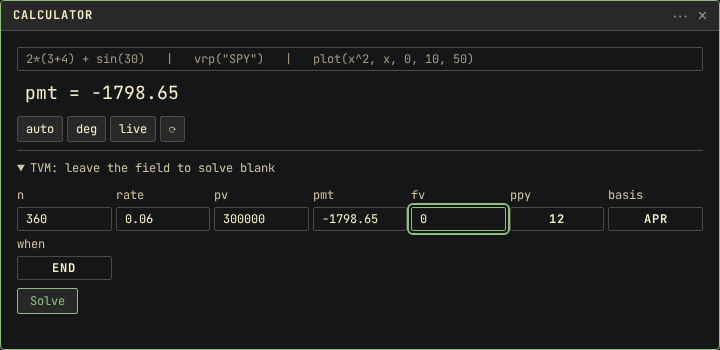
Press Enter.
Result
The pmt field shows -1798.65, and the result line above it shows
pmt = -1798.65: a payment of 1,798.65 a month, paid out.
With ppy at 12 and basis at APR, the solver divides the yearly
rate by 12 and charges 0.5% a month. With basis at EAR, the solver
treats 0.06 as the rate after a year of monthly compounding. The monthly
rate is lower, and the payment is -1768.11.
Set when to begin and press Enter with pmt empty. The payment
is -1789.70. Each payment is made a month earlier, so it reduces the
balance before that month's interest is charged.
Other ways
Solve for another field
Any of the five fields can be the empty one. To compute how long a
larger payment takes, type -2500 in pmt, empty n, and press
Enter. n shows 183.715911, a little over 15 years. To compute the
rate for a payment, fill pmt and empty rate. The solver searches
for the rate and shows it in input form, here 0.060000.
If something goes wrong
E_DOMAIN: tvm needs exactly one unknown: two fields are empty, or none is. Fill every field except the one to solve, then press Enter.E_NO_SOLUTION: the values do not describe a loan. Check the signs first. A positivepvwith a positivepmtmeans money is received at the start and with every payment, so the loan is never repaid.- The payment is about ten times too large: ppy is still 1, so the solver charges 6% each period. Set ppy to 12 and solve again.
"..." is not a number: a field contains a comma or a symbol, such as300,000. Type digits only.