Make your first API call
Create an API token on the site, send it with curl, and list the symbols that the API covers.
Goal
Create an API token and list the symbols that the API covers with one
curl call.
Before you start
Sign in to the site. The steps use curl, which is included with macOS,
Linux, and Windows 10 and later. Every example uses the base address
https://tickplunge.com.
Steps
-
Click Account in the top bar, then Settings.
-
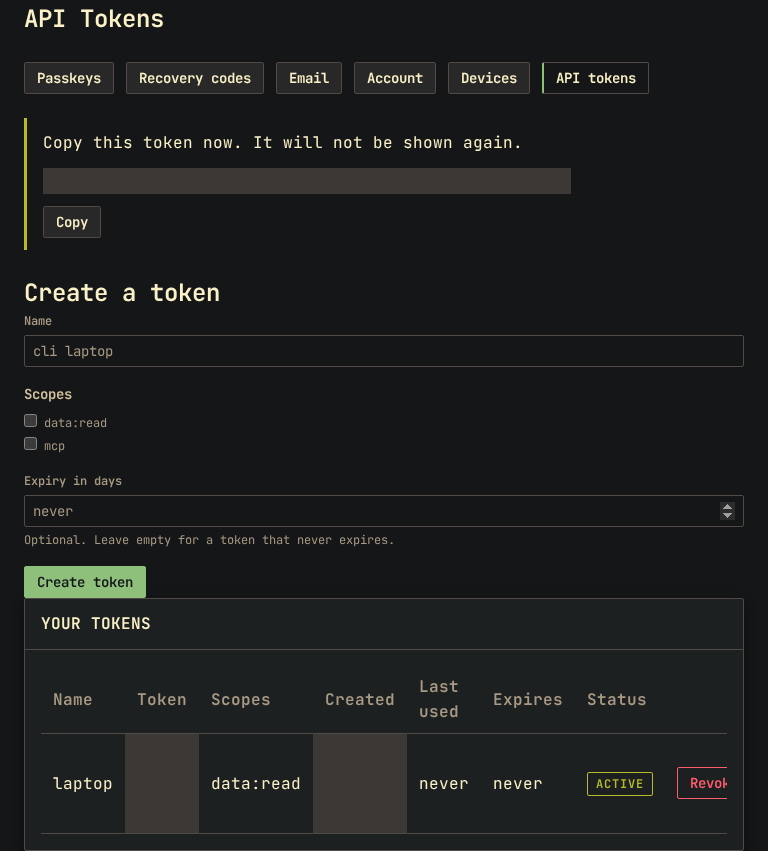
In the row of buttons under the page title, click API tokens.
-
Under Create a token, type a name for the token, such as
laptop. -
Select data:read. Leave mcp clear.
-
Leave Expiry in days empty for a token that never expires, or type a number of days.
-
Click Create token.
-
Copy the token, which starts with
tp_. The site shows it only once. -
In a terminal, store the token in a variable:
export TP_TOKEN=tp_...with your own token. -
Request the symbol list:
curl -H "Authorization: Bearer $TP_TOKEN" https://tickplunge.com/api/v1/symbols
Result
The terminal prints one line of JSON. Shortened, it is:
{"curated_class":["SPY","QQQ","DIA","IWM","TLT"],"symbols":["SPY","QQQ","IWM","DIA","AAPL"],"vol_surface_skipped":["BOIL"]}
symbols: every symbol the API covers, 31 on 2026-10-26.vol_surface_skipped: the symbols that have no volatility surface.curated_class: described in the API reference.
The new token appears under Your tokens with its first characters, its scope, and the date it was last used. Every other call in the API reference uses the same header with a different address.
Other ways
Read the docs data without a token
The pages under /docs are also available as plain data without a
token, such as /docs/measures.json and /docs/functions.json. A token
is required only for the data under /api/v1.
Use one token per program
Create one token per program or computer. You can then revoke one token without affecting the others.
If something goes wrong
Every refused call returns JSON with the cause in error:
{"error":"token_revoked","message":"This token has been revoked."}
| Status | error |
What to do |
|---|---|---|
| 401 | unauthorized |
Send the Authorization: Bearer header; check that $TP_TOKEN is set |
| 401 | token_invalid |
Copy the whole token again, from tp_ to the end |
| 401 | token_revoked |
Create a new token; this one was revoked |
| 401 | token_expired |
Create a new token; this one passed its expiry |
| 403 | scope_denied |
Create a token with data:read ticked |
| 429 | rate_limited |
Wait the seconds in the Retry-After header, then call again |
| 429 | quota_exceeded |
Your plan's daily calls are spent; the count restarts at 00:00 UTC |
Revoke on the API tokens page takes effect immediately and does not ask for confirmation.